Place one trade. Every account you run copies it.
LucianAlgo watches your master account and repeats each trade on your other accounts, sized to each account's own balance and rules, on MT5, cTrader, TradeLocker, Match-Trader, Tradovate and NinjaTrader, or from your TradingView alerts. It runs in our cloud, so your computer can be off.
No card needed. 1 master and 2 slave accounts included.
What happens between your trade and theirs
Every copy goes through the same five steps. Our part takes a few milliseconds; most of the total time is your brokers filling the orders.
Your master trade fills
You trade as usual, by hand or with your own EA or strategy, on the account you set as master.
We see it
MT5 masters are checked every 2 ms. cTrader and NinjaTrader send each trade the moment it happens. TradeLocker and Match-Trader masters are checked every second.
Each slave gets its size
The slave's own sizing rule works out the lot, then your minimum and maximum lot limits are applied.
The symbol is matched
Broker names are translated:
XAUUSDtoGOLDorXAUUSD.m,US500toESorMESfutures, and back.The slave order is placed
Each account has its own queue, so a slow broker never holds up the others. The new ticket is linked to your master ticket.
Closing half closes half
A partial close on the master closes the same share of every slave position.
Stops and targets follow
Move your stop loss or take profit and the slaves move theirs. You can turn this off per account.
Old trades stay put
Positions already open when you connect a master are not copied, so nothing surprising opens.
Your terminals run in our cloud, not on your laptop
You sign in once with your account login. We run the terminal for you around the clock, including MT5, which is hard to run on a Mac.
Your computer can be off
Copying continues when your laptop is closed, asleep or offline.
One process per account
Every account runs separately. If one broker freezes or disconnects, your other accounts keep copying.
An IP address of your own
Trading with a prop firm? Add a dedicated IP to any paid plan for $5 a month, in your country where one is available. Your accounts then trade only through it, so your trading is kept apart from other customers' and never appears to come from a shared address.
Only your trades reach your accounts
A master only ever copies to slaves owned by the same customer. Passwords are stored encrypted.
 Master, MT5
Own terminal processyour IP
Slave, MT5Own terminal processyour IP
 Slave, cTrader
Open API sessionyour IP
 Slave, Match-Trader
Platform API sessionyour IP
Separate processes, separate IP, never shares trades
With the dedicated IP add-on ($5/month), your accounts get an IP of their own.
Mix platforms freely
Your master and your slaves don't need to be on the same platform or broker. An MT5 master can drive a cTrader challenge account and a Tradovate futures account at the same time.
Master or slave, running in our cloud
- MetaTrader 5Runs headless in our cloud from your login, or through our EA
- cTraderConnect with your cTrader ID. Master trades stream in instantly
 TradeLockerConnect with your platform email and password
- Match-TraderConnect with your platform URL, broker ID and login
Futures
 NinjaTrader 8Master or slave through our add-on, which runs in your NinjaTrader
 TradovateReceives copies, with forex and CFD trades mapped to futures
Signals
 TradingViewYour strategy or chart alerts act as a master, through a private webhook. Counts as one master account
US500 to ES or MESNAS100 to NQ or MNQXAUUSD to GC or MGCContract months are picked for you, like ESZ6
Each slave decides its own size
Pick one sizing rule per slave account. Try your own numbers; the results use EURUSD, where one pip on one lot is worth $10.
Multiplier
Master lot times your multiplier.
Equity ratio
Scales with your balance compared with the master's.
Risk per trade
Loses your chosen percentage if the stop loss is hit.
Fixed lot
The same size on every trade.
See every copy, and how fast it was
The dashboard shows each master trade with its copies underneath, and measures how long every copy took.
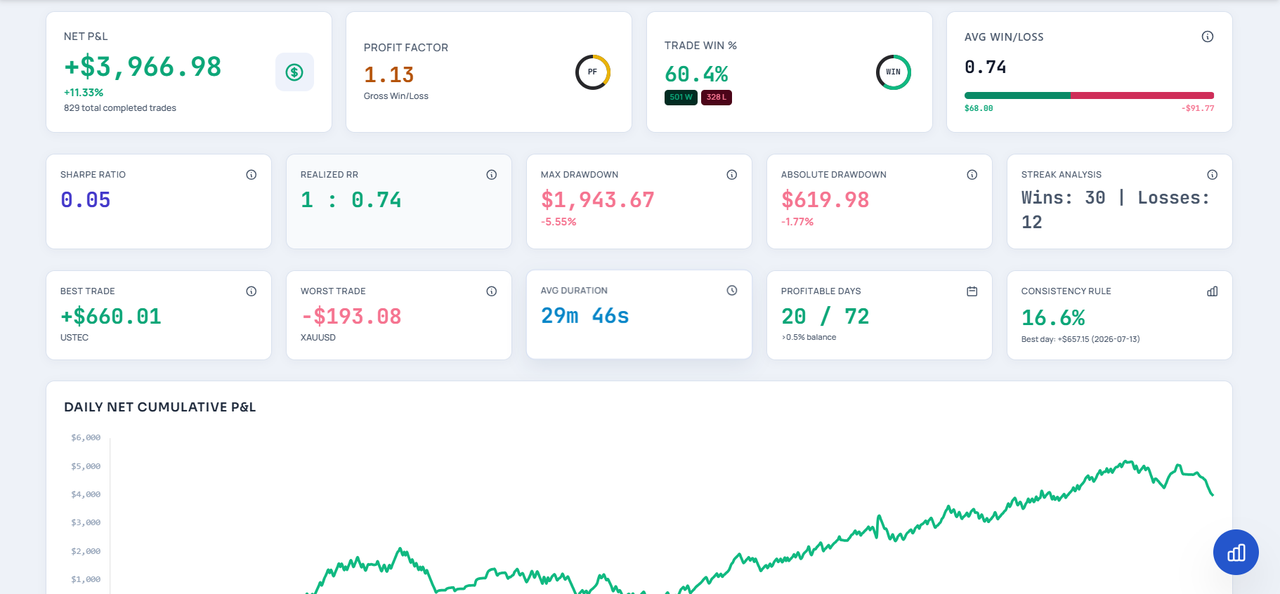
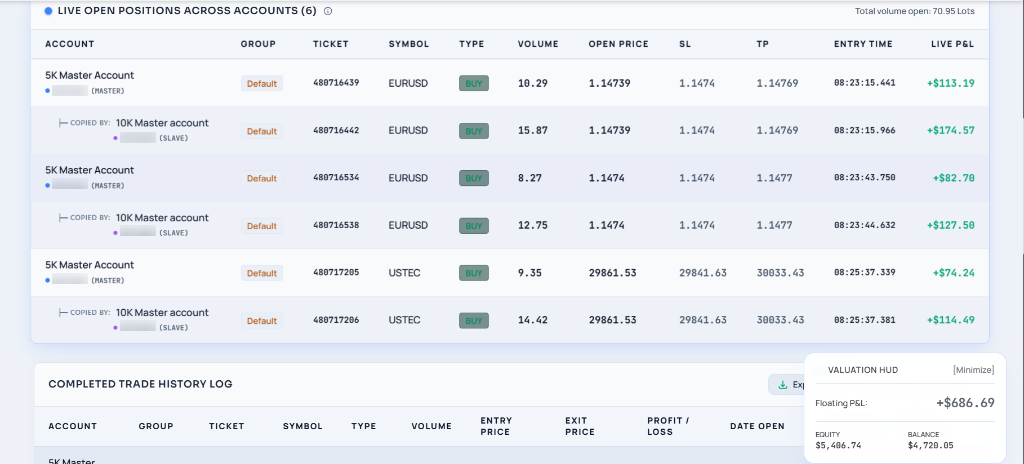
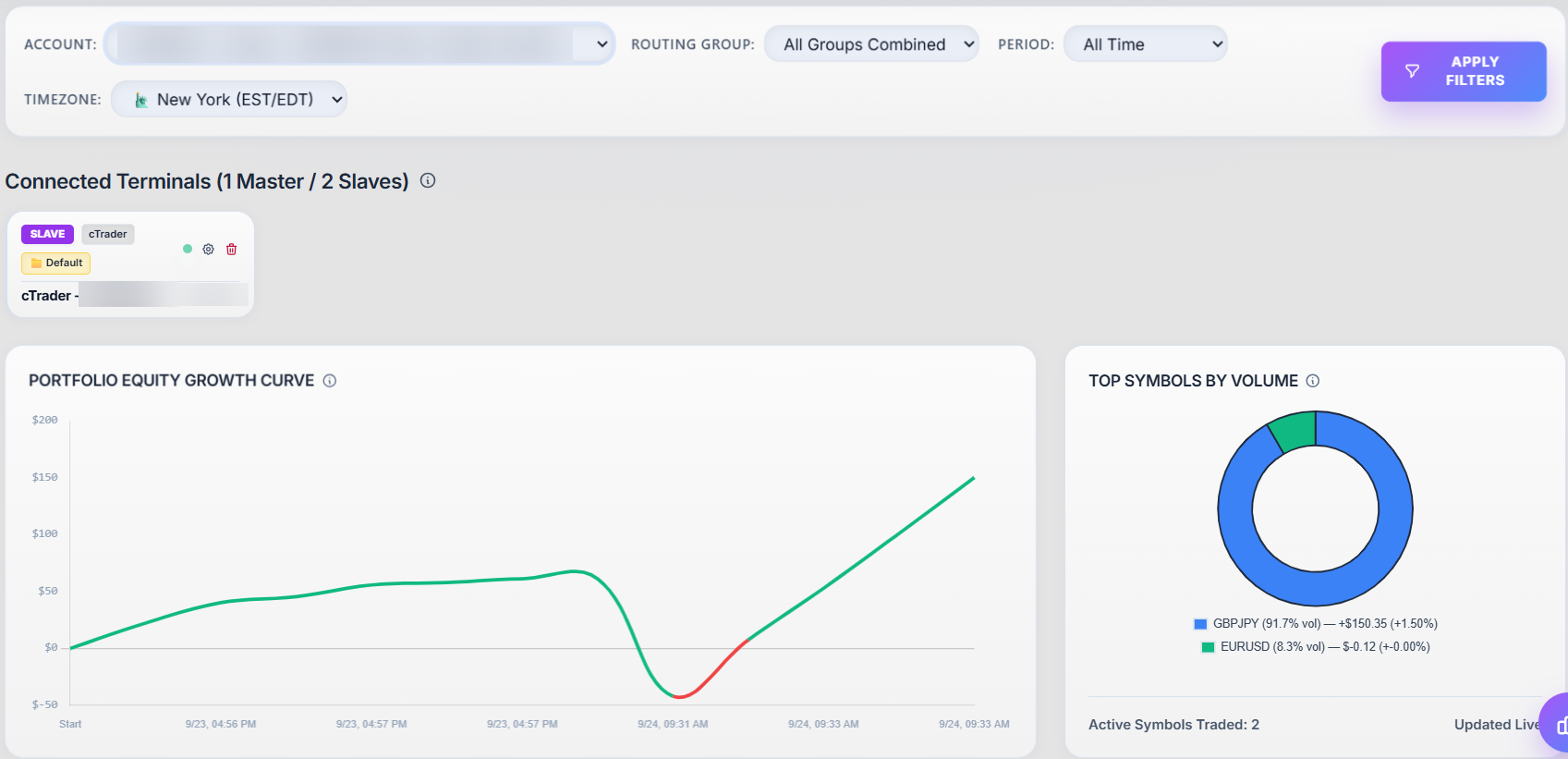
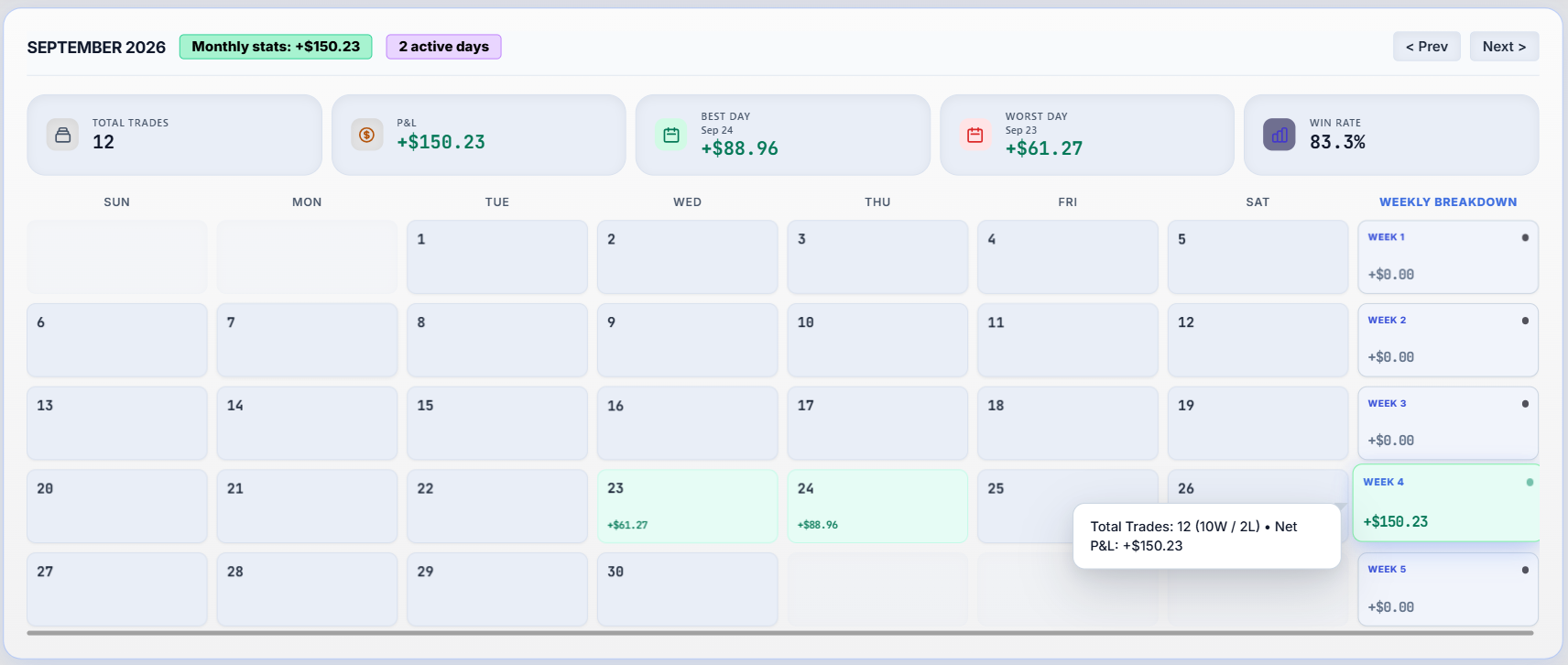
- Copy speed for every trade on every slave
- Failed copies listed with the broker's reason
- Close all on every account, or chosen ones, in one click
- Routing groups to send a master only to certain slaves
- Invoices and plan changes from your account page
- Trade history synced from each account when you add it
See it in action
The copier taking live trades: one trade on the master, and every account copying it at its own size.
What traders say about us
Pay for the accounts you connect
A master and a slave each count as one account. Every paid plan includes every platform. Trading with a prop firm? Add a dedicated IP for $5 per 30 days, billed on its own from the day you pay. Need more accounts for a while? Add them to any plan for 1, 3, 6 or 12 months. Upgrades apply straight away and keep your renewal date; downgrades start when your current period ends.
| Feature | 7-Day Free Trial $0 for 7 days, no card | Starter Plan $27/month 3 accounts | Custom Plan $10/month | Pro Trader $79/month About $6 per account | VIP Fund Manager $199/month About $3.32 per account | Unlimited $299/month No account limit, on our cloud | Platinum Enterprise Let's talk Unlimited, on your own server |
|---|---|---|---|---|---|---|---|
| Accounts | 3 | 3 | You choose | 13 | 60 | Unlimited | Unlimited |
| Masters and slaves | 1 and 2 | 1 and 2 | Any mix | 3 and 10 | 10 and 50 | Unlimited | Unlimited |
| MT5 and MT4 | Included | Included | Included | Included | Included | Included | Included |
| cTrader | Included | Included | Included | Included | Included | Included | Included |
| TradeLocker | Included | Included | Included | Included | Included | Included | Included |
| Match-Trader | Included | Included | Included | Included | Included | Included | Included |
| NinjaTrader 8 | Included | Included | Included | Included | Included | Included | Included |
| Tradovate | Included | Included | Included | Included | Included | Included | Included |
| Dedicated IP, isolated from other customers | Shared test IP | +$5/mo | +$5/mo | +$5/mo | +$5/mo | +$5/mo | Your own server |
| Where your accounts run | Our cloud, 24/7 | Our cloud, 24/7 | Our cloud, 24/7 | Our cloud, 24/7 | Our cloud, 24/7 | Our cloud, 24/7 | Your own server |
| All four sizing rules and lot limits | Included | Included | Included | Included | Included | Included | Included |
| Routing groups and close all | Included | Included | Included | Included | Included | Included | Included |
| Analytics, copy speed and habit scores | Included | Included | Included | Included | Included | Included | Included |
| Your company's branding | Not included | Not included | Not included | Not included | Not included | Not included | Included |
| Support | Standard | Standard | Priority email | 24/7 chat | 24/7 chat | Account manager | |
| Get started | Start trial | Choose Starter | Choose Custom | Choose Pro | Choose VIP | Choose Unlimited | Talk to us |
Prices are in US dollars. Quarterly and yearly billing are cheaper per month. Paid plans start from your dashboard after you register.
Comparing trade copiers? See our checklist of what to compare.
Questions traders ask us
Do I need to keep my computer or MT5 running?
No. MT5, cTrader, TradeLocker and Match-Trader accounts run in our cloud all day, every day, including during the free trial. You only need a browser to change settings, and it works from a Mac or your phone. NinjaTrader is the exception: its add-on runs inside your own NinjaTrader.
How fast are trades copied?
Our engine adds a few milliseconds per copy. The rest is how quickly your brokers fill the orders, which usually takes longer than our part. MT5, cTrader and NinjaTrader masters are picked up almost instantly; TradeLocker and Match-Trader masters are checked every second. The dashboard shows the measured time for every copy.
Which accounts can be the master?
MT5, cTrader, TradeLocker, Match-Trader and NinjaTrader 8 accounts can be masters or slaves. TradingView alerts can be a master too: your strategy or chart alerts open, close and change trades on your slaves. Tradovate accounts receive copies as futures.
What happens when I close part of a trade or move my stop?
The slaves close the same share of their position, and move their stop loss and take profit to match yours. If you close everything, the slaves close everything.
Can I copy between forex, CFDs and futures?
Yes. Index and gold trades are translated to the matching futures contract, standard or micro, with the current contract month chosen for you, and futures trades are translated back to index CFDs.
Do I need a dedicated IP?
Only if you trade prop-firm accounts. Most brokers are fine with the server IP. Many prop firms look at where trades come from and flag accounts that share an address with other people, so the dedicated IP add-on ($5 a month, on any paid plan) gives your accounts their own IP, in your country where one is available. You can add it when you choose a plan, or later from your dashboard; it then starts with your next billing period.
Can I use it with prop firm accounts?
Many traders do, but every firm has its own rules about copying, so check yours first.
What if a copy fails?
Failed copies are listed in your dashboard with the reason the broker gave, such as market closed or not enough margin, so you can act on them. If the reason mentions the server (for example the broker server can't be reached or isn't set up yet), raise a support ticket and our technical team will look into it.
How does the free trial work?
Register and you get 7 days with 1 master and 2 slave accounts on every platform, futures included: MT5, MT4, cTrader, TradeLocker, Match-Trader, DXtrade, TopstepX, Tradovate and NinjaTrader 8. No card is needed. If you need a little longer, you can ask for more trial days from your dashboard when the trial ends.
Talk to the people who built it
Ask about your setup, a live demo, or the Platinum Enterprise plan. We usually reply within one business day.


